Google Sheets Mail Merge: Emails, PDFs, and Where Each Breaks
By Josh ·
Google Sheets has no mail merge menu. You will look for it twice, because Word has had one since the nineties and it feels like it should be there.
Does Google Sheets have a built-in mail merge? No. Gmail has one, on some paid Google Workspace editions, and it sends email only. For documents, one PDF or letter per row, you need an add-on or a tool that runs outside Google. This guide covers both jobs, because a Google Sheets mail merge means two different things and the tools for them barely overlap.
First, which job is it?
- Email merge: each row gets a personalized email. "Hi Maria, your balance is $1,240."
- Document merge: each row becomes its own file. An invoice, a certificate, an offer letter, a report.
If it is the email job, the answer is short and free. On an eligible Workspace edition, use the merge toggle in Gmail's compose window. On free Gmail, install YAMM or Mailmeteor. The next section has the steps and the daily caps, and it is the whole answer for that job. It is also the only part of this page where the mail leaves from your own Gmail address; every document tool further down sends from somewhere else.
If it is the document job, or the two together (make the PDF, then email it to that row), the rest of the page is for you. That is the half Google never built, and it is where the free routes hit ceilings nobody mentioned.
Mail merge from Google Sheets to Gmail
Gmail's built-in mail merge
If your Google Workspace edition includes it, this is the shortest path on the page:
- Open a compose window and turn on Use mail merge (the spreadsheet icon by the To field).
- Link your spreadsheet, pick the tab, and choose the column that holds email addresses.
- Write the email with merge tags like
@firstnamethat pull from your other columns. - Preview one or two recipients, then send.
Note: send the preview to yourself first. A blank cell behind @firstname does not fail loudly. It ships "Hi ," to a customer.
The conditions Google attaches:
- The edition gate is stricter than "paid." Business Starter does not get the toggle. Workspace Individual, Business Standard and Plus, and the Enterprise and Education tiers do. Free @gmail.com accounts are out entirely. If the toggle is missing, read Google's eligibility list (opens in a new tab) before assuming something is broken.
- It personalizes the text. An attachment goes to everyone as the same file; there is no way to give each row its own document.
- It caps at 1,500 recipients per rolling 24 hours, and that budget is shared with your regular outgoing mail.
On the right tier, with email as the whole job, use this and close the tab.
YAMM, Mailmeteor, and the other merge add-ons
YAMM (Yet Another Mail Merge) and Mailmeteor are the two best known Gmail merge add-ons. Write the template as a Gmail draft with {{placeholders}}, then open the add-on from the spreadsheet and pick that draft. You get open tracking and scheduling, and both work on free Gmail accounts.
YAMM's free plan is 20 recipients a day. Its Pro plan lifts that to 400 on Gmail and 1,500 on Workspace, and Gmail's own limit sits underneath whichever one you buy. YAMM's pricing page says a new Workspace account may be held to 400 for a while. Read it before planning a 900-person send.
When the list is bigger than the day's quota, the merge stops partway. You are left with a sent folder and an afternoon of working out who got the email and who didn't.
Apps Script, if you'd rather own it
Twelve lines of Apps Script do an email merge with no add-on and no subscription:
function sendMerge() {
  // assumes columns are Name, Email, Amount, in that order
  const rows = SpreadsheetApp.getActiveSheet().getDataRange().getValues();
  const data = rows.slice(1);
  data.forEach(([name, email, amount]) => {
    GmailApp.sendEmail(
      email,
      "Your invoice from Acme",
      "Hi " + name + ",\n\nYour total this month is quot; + amount + ".\n\nThanks!"
    );
  });
}
Apps Script has its own daily email quota, separate from Gmail's: 100 recipients a day on a free account, 1,500 on Google Workspace (Google's quota table (opens in a new tab)).
This is the naive version. It has no retry and no record of which rows already went out, so when a run dies at row 73 you reconstruct where it stopped from the sent folder. Making it safe is the real cost of the DIY route, and it is not twelve more lines. It is fine for a hundred rows a month and miserable as a system other people depend on.
One PDF per row from Google Sheets
This is the half most people who searched "google sheets mail merge template" wanted: a template, a sheet, and one finished document per row. Word calls this a merge to individual files. Google has nothing for it, so every route below is something you install or somewhere you upload to.
Autocrat
Use Autocrat. For document merges that are small and occasional it is the answer.
Autocrat is free and has been around for years. It does the job:
- Write the template as a Google Doc or Slides file, with
<<tags>>where the values go:<<first_name>>,<<amount_due>>. - In the sheet, open Extensions, then Autocrat, and start a new job.
- Pick the template file, then map each tag to a column. Autocrat lists the tags it found, so a typo in the template shows up here as an unmapped tag.
- Choose multiple output mode, so each row becomes its own file, and set the file name from a column (
Invoice <<invoice_number>>). - Pick the destination folder and the output type. PDF is one of the choices.
- Optionally set the share or email step, so each file goes to that row's address.
- Save the job and run it. Autocrat writes the file link back into the sheet.
You can also set the job to run when a form is submitted or on a timer.
Autocrat runs on Apps Script inside your Google account, so it inherits the same daily quotas as every other Apps Script add-on here. Big or frequent batches fail partway with "Service invoked too many times". Others stall with no error at all, which leaves you nothing to search for. The fix guide for those errors covers both, and there is a fuller comparison at sheetrender.com/vs/autocrat.
Note: the daily budget is your Google account's. Four 200-row jobs on the same account draw from the same budget as one 800-row job, and people find that out on the third one.
If your batches are small and occasional, none of that will bite you.
Form Publisher and Portant
Form Publisher does the same template merge, from Google Forms submissions or straight from sheet rows, and can produce a Google Doc and a PDF per row. Portant connects Google Sheets to Docs and Slides templates too, though its free tier is thin (30 documents a month when I last checked). I have no complaints about either one. Form Publisher runs inside your Google account like Autocrat, so the quota table below applies to it just the same. Portant does its processing outside your account, so its ceilings are its plan's, though mail it sends through your Gmail still spends your Gmail budget.
Rolling your own, the document version
You can script this half too: copy a Google Docs template, replaceText per row, export with getAs('application/pdf'), save to a folder. It works. It is several times longer than the email script, and it burns through quota faster than anything else on this page. Every row copies a file and exports a PDF before anything is sent, and a free account gets 250 document creations a day.
SheetRender
SheetRender is our product.
We shipped the first version with <<tag>> templates, the same as everything above, and nobody wanted it. The people writing to us already had the document. It was a PDF from a designer, or last year's certificate, and they were not going to rebuild it inside a Google Doc to make a robot happy.
So the template is the whole difference. You upload one finished example instead of tagging placeholders into a Google Doc. A PDF works, and so does last year's certificate as a screenshot. We rebuild that example as a template with its fields mapped to your columns. Upload a spreadsheet or connect the Google Sheet, check the mapping, and generate. The same flow runs from a sidebar inside the sheet, which is SheetRender on the Google Workspace Marketplace. Once the design is built, the sidebar shows it next to your rows and offers one button to create every PDF.
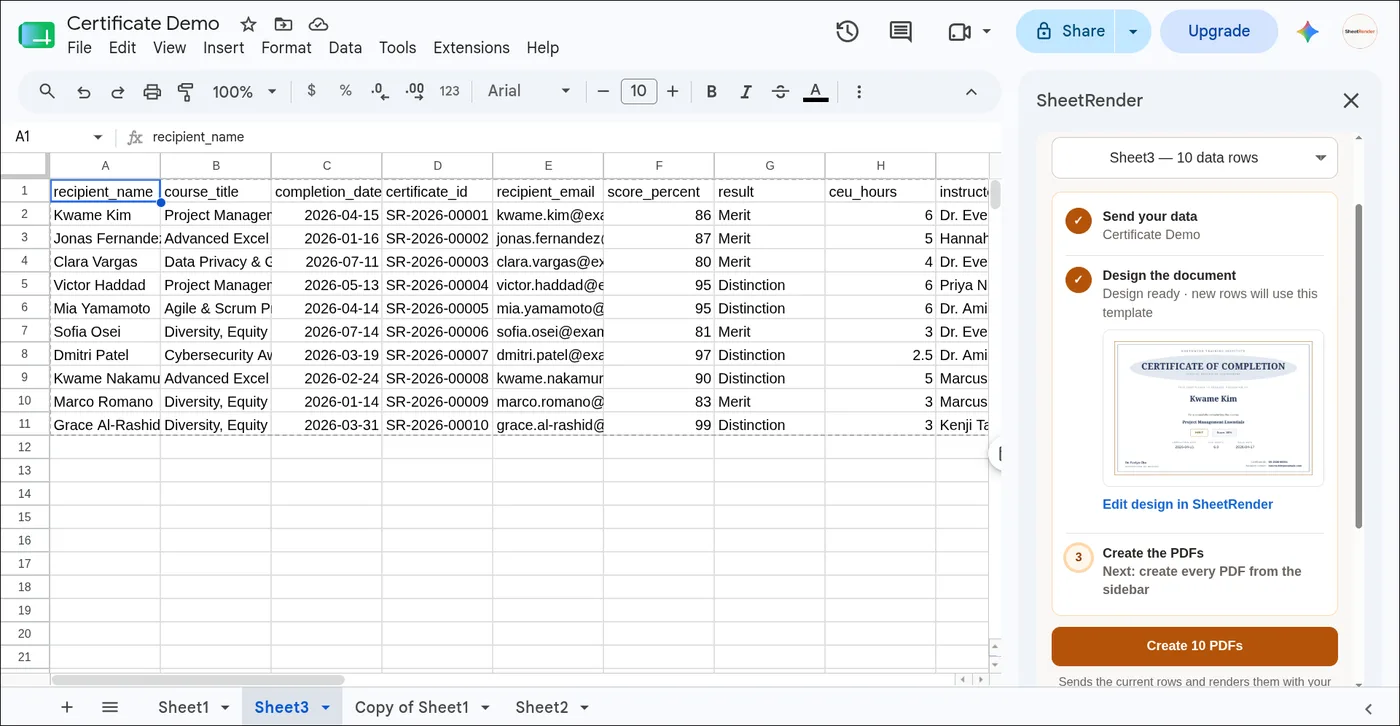
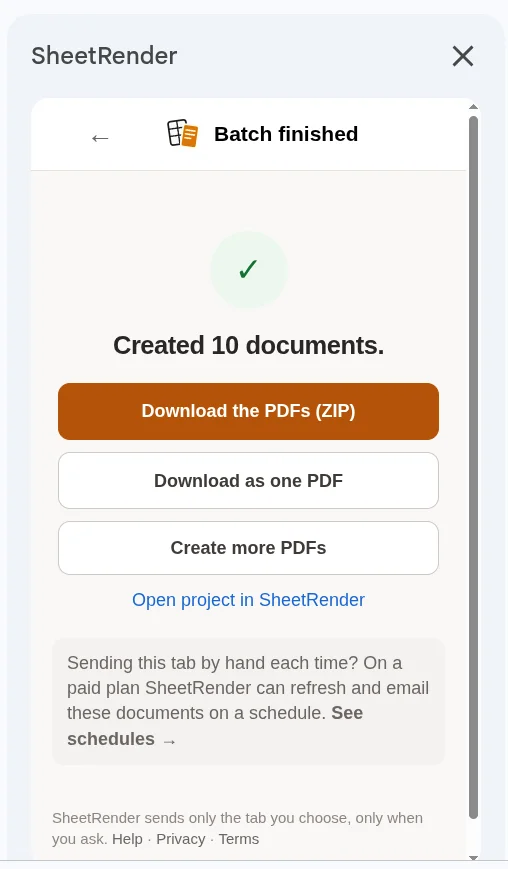
The output is one PDF per row, delivered as a zip by default; it can also land in a Google Drive folder or go out as an email to each row. When a row fails, the rest of the batch still renders, and the download page lists the failed rows with the reason and a retry for just those. If the sheet keeps growing, the run can repeat on a schedule.
What you give up:
- The emails do not come from your Gmail. They go out from our servers, from a sheetrender.com address on the free and Starter plans and from your own domain on Pro. If the From line has to be you@gmail.com, use Autocrat or YAMM instead.
- Your data leaves Google. The example document, the column names, and a few sample rows go to Anthropic's API to build the template, and the full sheet is rendered on our servers. If a written policy says the roster cannot leave Drive, Autocrat wins.
- The first template takes a review. The mapping is usually right, but a column called "Amt" next to one called "Amount Due" is a coin flip, and you check it before the batch, not after.
- Every plan is capped. Free is 50 documents and 50 emails a month, two active templates, and a "Made with SheetRender" line at the foot of every page, with no scheduled runs. Starter is 1,500 documents and 1,500 emails a month with one schedule; Pro is 10,000 of each. The pricing page has the current numbers.
- It costs money past the free tier, where every Google-side route on this page stays free and only runs out of quota.
Doing both: generate the PDF, then email it
The free stack can do the combined job. Autocrat will email each merged file to a per-row address, and YAMM can attach a file from a Google Drive column. Nothing falls over at the first hurdle.
What happens instead is quieter. Each row now spends from several budgets at once, and the tightest one is usually email: 100 recipients a day on a free account. Behind that sit 90 minutes of trigger runtime for the day and a six-minute limit on any single execution. You hit whichever ceiling comes first, and it is rarely the one you were watching.
Either way, a 200-row generate-and-email run tends to die in the middle, and in my experience it picks 4:55 on a Friday to do it. The delivery half has its own guide, email everyone their own PDF, with the attachment size limits and the four ways a send run goes wrong. At volume, this combined job is why the hosted tools exist.
Where the rest of the document job is covered
The tools that turn rows into PDFs on a schedule, including which of them can run unattended, are compared in convert a spreadsheet to PDF automatically, and the Word-side equivalent is the macro route for splitting a merge into separate PDFs. Two spokes cover a specific document: certificates in bulk from a spreadsheet and the donation receipt template with its IRS wording. A CSV file rather than a live sheet is the CSV to PDF guide. A report per client on a weekly clock is automated PDF reports. The sheet itself as a PDF, with no merge in it, is generate a PDF from Google Sheets.
The quota cheat sheet
| Limit | Free Gmail | Google Workspace |
|---|---|---|
| Gmail messages per rolling 24 hours (normal sending) | 500 | 2,000 (500 on a trial) |
| Gmail built-in mail merge | not available | 1,500 recipients per rolling 24 hours, shared with regular mail |
| Apps Script email recipients per day (scripts, some add-ons) | 100 | 1,500 |
| Apps Script trigger runtime per day (Autocrat, Form Publisher, your scripts) | 90 min | 6 hours |
| Apps Script documents created per day | 250 | 1,500 |
| Apps Script single execution | 6 min | 6 min |
These are Google's published numbers as of mid-2026, and Google adjusts them without announcing it. Check the quota page before you plan a batch around any row in this table.
Quick answers
What is the daily limit for Gmail's mail merge? 1,500 recipients per rolling 24 hours on eligible Google Workspace editions, shared with your regular outgoing email.
Can I mail merge from Google Sheets for free? Yes. Apps Script and Autocrat are free; what limits them is your Google account's daily quotas. YAMM's free plan covers 20 recipients a day.
Can Google Sheets mail merge to PDF? Not on its own. Autocrat, Form Publisher, and Portant turn each row into a Doc and a PDF from inside Google; SheetRender does it from an example document on its own servers. Gmail's merge makes emails only.
Can Gmail's mail merge send a different attachment to each person? No. It personalizes the text, and any attachment is the same file for every recipient. Per-row attachments need an add-on like YAMM with a file column, or a generate-and-deliver tool.
Does SheetRender send from my Gmail? No. It sends from its own servers, from a sheetrender.com address or your own domain on Pro. For sends that must come from your Gmail account, use Gmail's merge, YAMM, or Autocrat.
Which one should you pick?
- Personalized emails only, on an eligible Google Workspace tier: Gmail's built-in merge. Done.
- Personalized emails only, on free Gmail or with tracking: YAMM or Mailmeteor, minding the daily caps.
- Comfortable with code and the volume is small: Apps Script.
- Documents from rows, small occasional batches: Autocrat. It is free and good at this.
- Documents from rows every Monday, for a roster that keeps growing, especially generate-then-email: SheetRender.
If you do this once a year, any free path is the right answer. Every Monday, the expensive part is being the person who checks whether the batch finished. That is when I would use ours.