Mail merge letter template
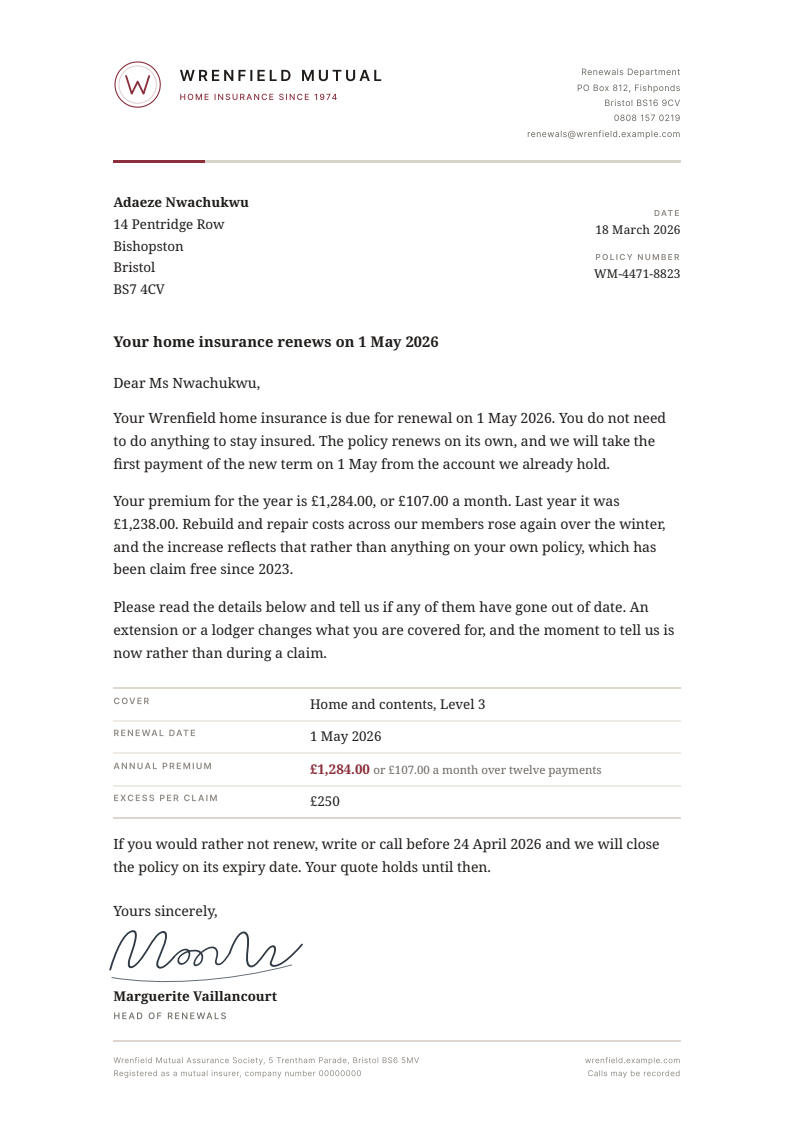
A mail merge letter template that is already a finished document: a renewal notice on a proper letterhead, with the contact spreadsheet behind it. Row one is filled in and eleven more rows are waiting.
Free for personal and commercial use, no attribution required. The license, in one paragraph.
Try it with your rows
Paste up to 25 rows from your spreadsheet and get one PDF per row in this design, with no account.
Free for up to 50 documents a month, shared by everyone on the same internet connection. Each page carries a small "Made with SheetRender" line at the foot. Your rows are only used to make the documents. Preview and PDF links stop working after an hour, and the files are deleted soon after.
Copy the cells from Excel or Google Sheets™, headings included, and paste them here. CSV text works too.
Who a mail merge letter template is for
Your Excel mail merge to Word ran perfectly and handed back one 400-page document. The job needed 400 files. The merge is not the hard part. Word and Google Docs both do it well, and both of them finish with everyone stacked end to end in a single file, so getting separate mail merge PDF documents means adding a macro or an add-on on top. The letter here is the kind that goes out in bulk: a renewal notice where the name, the address, the policy number, and the amounts change on every row. Rebrand it and it is a rent review or a membership notice.
What is in the spreadsheet
The CSV and the Excel file hold the same 12 example rows. Every column below fills one part of the document.
| Column | Fills |
|---|---|
recipient_name | The person the letter is addressed to, first line of the address block. |
recipient_salutation | How the greeting names them, so "Ms Nwachukwu" prints as "Dear Ms Nwachukwu". |
address_line_1 | Number and street, or a flat and building name. |
address_line_2 | District or second address line, above the town. |
city | Town or city. |
postcode | Postcode, on its own line under the town. |
letter_date | The date at top right. In the sample each notice is dated about six weeks before that policy renews, so the column varies by row rather than holding one batch date. |
policy_number | The reference printed under the date. Swap in whatever number your reader would quote back to you. |
cover_type | First row of the details table: the cover, or the subject of whatever notice you rewrite this into. |
renewal_date | Appears in the subject line, the opening paragraph, and the details table. |
annual_premium | The headline amount, set in the accent colour. |
monthly_premium | The instalment figure, used in the paragraph and again beside the annual amount. |
previous_premium | Last year's figure, which is what makes the sentence about the increase concrete. |
excess | Last row of the details table. |
claim_free_since | The year this policy last had a claim on it, quoted in the paragraph about why the price moved. |
reply_by_date | The deadline in the closing paragraph for cancelling instead of renewing. |
What to change before you send it
Everything Wrenfield is yours to replace. The monogram is an inline SVG circle with a five point polyline inside it, the wordmark is Inter with wide letterspacing, and the accent claret (#8a2f3b) is used in exactly four places: the mark, the strapline, the short coloured segment of the rule under the letterhead, and the premium figure in the table. Change that one hex value and the whole sheet turns. The signature is a set of SVG paths rather than a scan, so redraw it, replace it with your own, or delete the block and type the name. The wording is an insurance renewal because that is the letter people merge most, and it rewrites cleanly into a rent review, a fee change, or a membership notice. What is worth keeping is the shape: a subject line that says what happened, a reason, a table of the details, and a date to reply by.
How to use it
- 1
Download both files. The PDF is the finished letter, and the CSV or XLSX is the contact list that produced it.
- 2
Open the spreadsheet and put your own recipients in, one row per letter. Keep the header names or rename them, as long as the document and the sheet agree on what each field is.
- 3
Replace the Wrenfield details in the letter: the monogram, the wordmark, the sender block at top right, the signature, and the registration line in the footer.
- 4
Merge it whichever way you already work. Word's Mailings tab and the Google Docs add-ons both read this spreadsheet happily, and both leave you one document to split afterwards.
- 5
To skip the split, upload the spreadsheet and the example letter to SheetRender and download a ZIP with one PDF per row, named from a column you pick. That is the whole mail merge from Excel to PDF, with no merge fields to insert. Free covers 50 documents a month, enough to prove the layout against your own rows before you pay for the run.
Mail merge PDF documents from Excel, one per row
The download is yours either way. What takes the time is the other 11 rows. Upload this spreadsheet and this example document to SheetRender and it builds the template for you, then renders one correctly named PDF for every row. It is our product, so read this knowing that. The free plan covers 50 documents a month and puts a small "Made with SheetRender" line at the foot of every page, which a certificate someone frames will not survive. Rendering on a schedule is paid.
Frequently asked questions
- How do I turn a mail merge into separate PDF files?
- Word and Google Docs both merge to one long document, so splitting it is a second job. In Word you run a short VBA macro that loops the records and exports each one as its own PDF. In Google Docs you use an add-on such as Autocrat with the job set to one file per row. The third route is a tool that writes separate files in the first place, which is what SheetRender does from a spreadsheet and one example document.
- Can I do a mail merge from Excel to PDF without Word?
- Yes. Nothing about the job requires Word: the spreadsheet holds the rows, and something has to lay out the page. Keep this letter as the layout and use any tool that reads the sheet and renders one PDF per row. SheetRender builds the mapping from the finished example itself, so there are no merge fields to insert and no template language to learn.
- What columns does a mail merge letter need?
- One column for every part of the page that changes between recipients, and nothing else. This sample uses 16, from the salutation at the top down to the date the reader has to reply by. Anything identical on every letter (the letterhead, the sender address, the signature, the legal line in the footer) belongs in the document rather than the spreadsheet, which is why the sample has no column for the company name.
- Will my letterhead survive the merge?
- It survives if the layout lives in the document instead of being rebuilt for each row. This example is a single self-contained HTML file with the monogram and the signature drawn as inline SVG, so there is no linked image to go missing and no font to substitute. The PDF on this page was rendered from that exact file, and every letter in a batch made from it carries the same letterhead.
- Can each letter be emailed to the person it names?
- Yes, as long as the address is in the same spreadsheet. This sample has no email column, so add one before you send. SheetRender can email each finished PDF to the address on its own row. Free covers 50 documents and 50 emails a month, and free pages carry a small "Made with SheetRender" line at the foot. Running the whole thing on a schedule instead of pressing the button yourself is a paid feature.
More free templates
- Course completion certificateA landscape A4 course completion certificate with a drawn guilloche border and a proper seal, set so the attendee name is the largest thing on the page. Beside it sits the attendee sheet that fills it in, one row per person.
- Job offer letterA job offer letter template that reads like something a real HR team sends. The key terms sit in their own panel, so the candidate lands on the salary and the start date before anything else, and the acceptance block at the foot gives them somewhere to sign. It comes with the candidate spreadsheet behind it.
- Donation receiptA one page donation receipt template with the donor spreadsheet behind it: a warm opening line over a gift summary block with the amount set large, and a record keeping panel you fill in with your own registration number and wording.