Job offer letter template
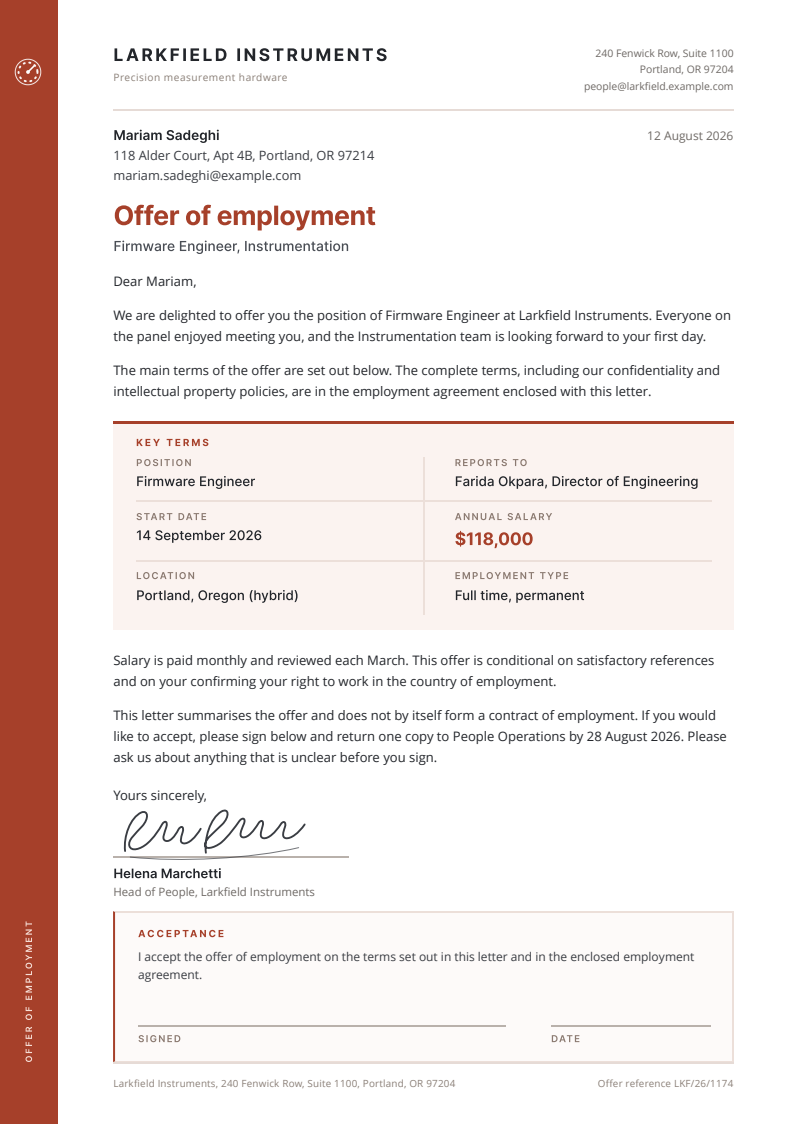
A job offer letter template that reads like something a real HR team sends. The key terms sit in their own panel, so the candidate lands on the salary and the start date before anything else, and the acceptance block at the foot gives them somewhere to sign. It comes with the candidate spreadsheet behind it.
Free for personal and commercial use, no attribution required. The license, in one paragraph.
Try it with your rows
Paste up to 25 rows from your spreadsheet and get one PDF per row in this design, with no account.
Free for up to 50 documents a month, shared by everyone on the same internet connection. Each page carries a small "Made with SheetRender" line at the foot. Your rows are only used to make the documents. Preview and PDF links stop working after an hour, and the files are deleted soon after.
Copy the cells from Excel or Google Sheets™, headings included, and paste them here. CSV text works too.
Who an employment offer letter batch is for
Fifteen offers go out this week, all from the same graduate intake. Every employment offer letter in a batch differs by about five fields, and copy-paste is where the mistake gets in: last week's salary still sitting in this week's letter, under the right name. Sending one offer? Edit the file and print it. Sending fifteen, from a spreadsheet you already keep, is the case this template was drawn for.
What is in the spreadsheet
The CSV and the Excel file hold the same 12 example rows. Every column below fills one part of the document.
| Column | Fills |
|---|---|
candidate_name | Name in the recipient block and in the greeting. |
candidate_address | Postal address under the candidate name. |
candidate_email | Shown under the address, and the column to email each finished PDF to. |
position_title | Role, in the subtitle and the Position term. |
department | Team name, in the subtitle beside the role. |
reports_to | Manager name and title, in the Reports to term. |
start_date | First day, in the Start date term. |
annual_salary | Salary, set large in the brand colour. |
location | Work location and pattern, such as hybrid or on site. |
employment_type | Full time, part time, permanent, or fixed term. |
letter_date | The date printed at the top of the letter, so a batch sent over several weeks does not all go out carrying one date. |
offer_expires | Date the signed copy is due back. |
offer_reference | Internal reference, printed in the footer. |
signatory_name | Who signs for the company. |
signatory_title | That person's job title, under the signature. |
What to change before you send it
The palette is a handful of CSS variables at the top of the file. Edit --brand and the spine repaints along with the salary figure; the paler tints beside it are versions of the same rust, so move those too if you go somewhere cooler than a warm red. The dial mark is inline SVG: paste your own logo in as SVG, or delete it and set a wordmark in the spine instead. The wording is kept plain and generic on purpose, and it is not legal advice. Have your own employment counsel read it against the law where you hire before the first letter goes out, and keep notice periods and probation in the agreement you enclose rather than in this one-page summary.
How to use it
- 1
Download the example letter and open it in a browser. Swap the company name and address for yours, then replace the dial in the left spine with your own logo.
- 2
Open the spreadsheet and replace the twelve sample candidates with your hires. Keep the column names as they are on the first run, because they are what makes the mapping obvious.
- 3
Sending a single offer? Type row 1's details straight into the HTML and print to PDF from the browser. Nothing else is needed.
- 4
Sending the batch: upload the spreadsheet and the finished letter to SheetRender. It reads the example, works out which text came from which column, and renders one offer PDF per row.
- 5
Before anything goes out, open two of the PDFs: the longest candidate name and the highest salary. Those are the two that show a layout problem first.
Offer letters in bulk from a candidate spreadsheet
The download is yours either way. What takes the time is the other 11 rows. Upload this spreadsheet and this example document to SheetRender and it builds the template for you, then renders one correctly named PDF for every row. It is our product, so read this knowing that. The free plan covers 50 documents a month and puts a small "Made with SheetRender" line at the foot of every page, which a certificate someone frames will not survive. Rendering on a schedule is paid.
Frequently asked questions
- Can I generate offer letters for a whole spreadsheet of candidates?
- Yes. Keep one row per candidate and one letter design, and almost any merge tool will do it: a Word mail merge or a Google Docs add-on handles a small intake, though you will fight the layout and then fight splitting the result into separate files. SheetRender is ours, so weigh this accordingly: upload the sheet and this example and it writes one offer PDF per row. Free covers 50 a month, with a small "Made with SheetRender" line at the foot of each page, which is fine for a pilot and wrong for letters you email to candidates.
- Is a job offer letter legally binding?
- It depends on what the letter says and where you are hiring, which is why this template describes itself as a summary and points to an enclosed employment agreement. Treat it as a starting layout, not as legal advice. Have an employment lawyer in the relevant country review your wording before you send the first one.
- What should a job offer letter include?
- At minimum: the job title, who the person reports to, the start date, the pay, the work location, and whether the role is full time, part time, or fixed term. This template puts those six in a panel of their own so a candidate can find them in a couple of seconds. Everything heavier, such as notice periods and confidentiality terms, belongs in the employment agreement you enclose.
- Can I open this offer letter example in Word or Google Docs?
- The example is a single self-contained HTML file, so a browser opens it directly and prints it to PDF with the layout intact. Word and Google Docs will import it, but both rewrite the CSS and the spine and the terms panel come through looking different. If you want to edit in a word processor, use the PDF as the reference for what to rebuild. The spreadsheet is supplied as both CSV and XLSX, so that side opens anywhere.
- How do I send each candidate their own letter?
- Keep an email column in the spreadsheet, which this one has. In SheetRender you pick that column and a subject line, and each rendered PDF goes to the address on its own row, so nobody receives a colleague's salary by accident.
- Can I change the colour and the logo?
- Yes, and it is quick. The rust is a CSS variable called --brand at the top of the stylesheet, so one edit recolours the spine and the salary figure together, with four paler tints of it declared right underneath. The logo is inline SVG in the top of the spine: replace that block with your own SVG, or drop it and set your company name in the spine instead.
More free templates
- Mail merge letterA mail merge letter template that is already a finished document: a renewal notice on a proper letterhead, with the contact spreadsheet behind it. Row one is filled in and eleven more rows are waiting.
- Course completion certificateA landscape A4 course completion certificate with a drawn guilloche border and a proper seal, set so the attendee name is the largest thing on the page. Beside it sits the attendee sheet that fills it in, one row per person.
- Donation receiptA one page donation receipt template with the donor spreadsheet behind it: a warm opening line over a gift summary block with the amount set large, and a record keeping panel you fill in with your own registration number and wording.