Donation receipt template
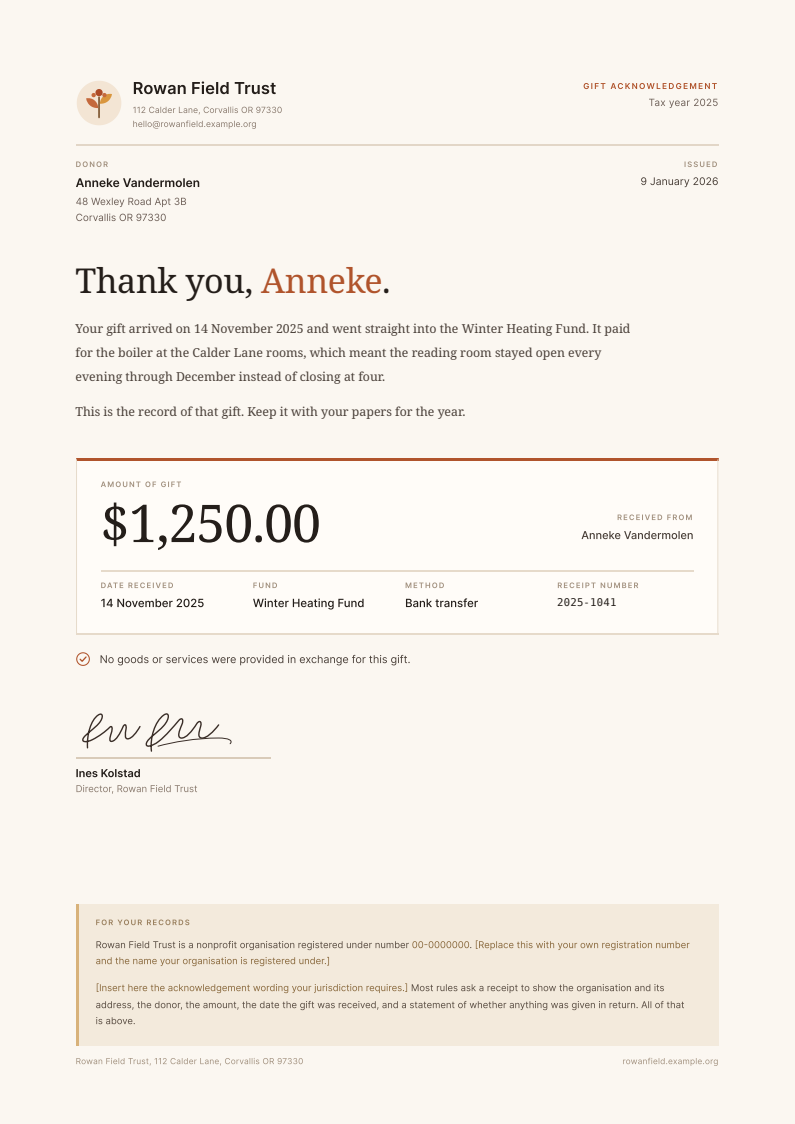
A one page donation receipt template with the donor spreadsheet behind it: a warm opening line over a gift summary block with the amount set large, and a record keeping panel you fill in with your own registration number and wording.
Free for personal and commercial use, no attribution required. The license, in one paragraph.
Try it with your rows
Paste up to 25 rows from your spreadsheet and get one PDF per row in this design, with no account.
Free for up to 50 documents a month, shared by everyone on the same internet connection. Each page carries a small "Made with SheetRender" line at the foot. Your rows are only used to make the documents. Preview and PDF links stop working after an hour, and the files are deleted soon after.
Copy the cells from Excel or Google Sheets™, headings included, and paste them here. CSV text works too.
Who year-end donation receipts are for
January, a small nonprofit, a donor export open on one screen and 900 gifts still to acknowledge. This donation receipt template is for the person who does development and finance in the same job. It is a letter first and a tax record second: a thank you at the top, then the amount, date, fund, and receipt number in a block a donor can find in three seconds, then the required statements sitting quietly at the bottom. If your CRM already issues receipts, use your CRM and stop reading. This is for the organisations whose giving history lives in a spreadsheet because it arrived through four channels and got reconciled by hand.
What is in the spreadsheet
The CSV and the Excel file hold the same 12 example rows. Every column below fills one part of the document.
| Column | Fills |
|---|---|
receipt_number | The unique receipt reference, shown in the gift summary block. |
receipt_date | The date the receipt itself was issued, printed top right under Issued. |
donor_name | Full name of the donor, used in the address block and beside the amount. |
greeting_name | First name or preferred name for the thank you line at the top. |
donor_address_line1 | Street address of the donor, first line of the postal block. |
donor_address_line2 | Town, region, and postcode, second line of the postal block. |
donor_email | Contact address for the donor. Not printed, but it is what you deliver to if you email the receipts. |
gift_amount | The amount received, set large in the summary block. Formatted with its currency symbol. |
gift_date | The date the gift was received, in the opening line and in the Date received field. |
fund_name | Fund, appeal, or programme the gift supported. |
payment_method | How the gift arrived: bank transfer, cheque, card, payroll giving. |
goods_or_services | The statement of whether anything was given in return, printed under the summary block. Per gift, because it changes when a donor takes a benefit. |
tax_year | The year the gift falls in, shown top right beside the acknowledgement label. |
What to change before you send it
Rowan Field Trust is invented, so replace its name and address wherever they appear, along with the example.org email. The mark beside the name is an inline SVG sprig you can recolour in place or delete outright; the accent is one terracotta value, #B0542C, repeated in the rule above the gift block and in the donor name. The two bracketed lines in the For your records panel are placeholders, and the page is wrong until you replace them with your own registration number and the wording your jurisdiction requires. The signature is an SVG path. Swap in your own or remove it and leave the printed name sitting over the rule.
How to use it
- 1
Download both files. Open data.csv and swap the twelve sample gifts for your own export: one row per gift, or one row per donor if you are sending a single annual summary.
- 2
Open example.html in a browser and edit it there. The organisation name, address, colours, and the drawn SVG mark are all in the one file.
- 3
Replace the two bracketed lines in the For your records panel with your registration number and the acknowledgement wording your jurisdiction asks for. Confirm that wording before you print anything, because the rules differ by country and they move.
- 4
For a handful of donors, print to PDF from the browser once per person and be done in twenty minutes.
- 5
For the whole file, run it through a mail merge or through SheetRender: upload data.csv and example.html, check the column mapping, render the batch. Free accounts cover 50 receipts a month, and free pages carry a small "Made with SheetRender" line at the foot that paid plans drop.
Donation receipts from a spreadsheet, one per gift
The download is yours either way. What takes the time is the other 11 rows. Upload this spreadsheet and this example document to SheetRender and it builds the template for you, then renders one correctly named PDF for every row. It is our product, so read this knowing that. The free plan covers 50 documents a month and puts a small "Made with SheetRender" line at the foot of every page, which a certificate someone frames will not survive. Rendering on a schedule is paid.
Frequently asked questions
- What information has to be on a donation receipt?
- Receipting rules differ by country, but the substance is usually the same: the name and address of the organisation, its registration number, the name of the donor, the amount received, the date it was received, and a clear statement of whether the donor got any goods or services in return. This template prints all of that on one page and leaves two bracketed lines for the specific wording your own regulator asks for. Check that wording against your jurisdiction before you send a batch. Nothing here is tax advice.
- Is this a 501(c)(3) donation receipt template?
- It is a general layout rather than a form tied to one country. People searching for a 501(c)(3) donation receipt template are usually after the same structure this one has: organisation details, donor, amount, date, and the statement about goods or services. What it deliberately does not do is assert what is deductible or quote a rule at you, because those change and I am not your accountant. Fill in the bracketed lines with the wording your organisation has been advised to use.
- Can I send one receipt covering all of a donor's gifts for the year?
- Yes, and for regular givers it is kinder than twelve separate letters. To use this as a year-end donation receipt template, group your export by donor first so each row holds the total for the year, then put the period in the fund or date field instead of a single gift date. The layout does not change. If you also need a line by line list of the gifts inside that summary, this single gift version is the wrong starting point and a statement layout will serve you better.
- Should I use my CRM instead?
- If your donor database issues receipts, yes. It already knows which gifts have been acknowledged and it will record that they went out, which a spreadsheet run will not do for you. Building donation receipts from a spreadsheet makes sense when the giving sits outside the CRM: a bank export, a platform payout file, cash counted at an event, or a database that receipts individual gifts but cannot produce a year-end summary.
- How do I turn a donor spreadsheet into one PDF per gift?
- Two routes. A Word mail merge will do it free: point Word at the CSV, place the fields, and merge to separate files, though controlling the layout takes patience and every design tweak means going back into Word. Or upload the CSV and this HTML to SheetRender, which is our product, and it renders one PDF per row with the columns mapped. Free does 50 receipts a month with a small "Made with SheetRender" line at the foot of each page, so a 900 gift January is paid either in SheetRender or in somebody's evenings.
- Can I email the receipts rather than posting them?
- The spreadsheet includes a donor_email column for exactly that. Most donors would rather have a PDF in their inbox in January than a letter in March, and it costs you nothing to produce. Keep the postal address on the document anyway, since a receipt that shows where the organisation is and where the donor is reads as a proper record.
More free templates
- Mail merge letterA mail merge letter template that is already a finished document: a renewal notice on a proper letterhead, with the contact spreadsheet behind it. Row one is filled in and eleven more rows are waiting.
- Course completion certificateA landscape A4 course completion certificate with a drawn guilloche border and a proper seal, set so the attendee name is the largest thing on the page. Beside it sits the attendee sheet that fills it in, one row per person.
- Job offer letterA job offer letter template that reads like something a real HR team sends. The key terms sit in their own panel, so the candidate lands on the salary and the start date before anything else, and the acceptance block at the foot gives them somewhere to sign. It comes with the candidate spreadsheet behind it.