Course completion certificate template
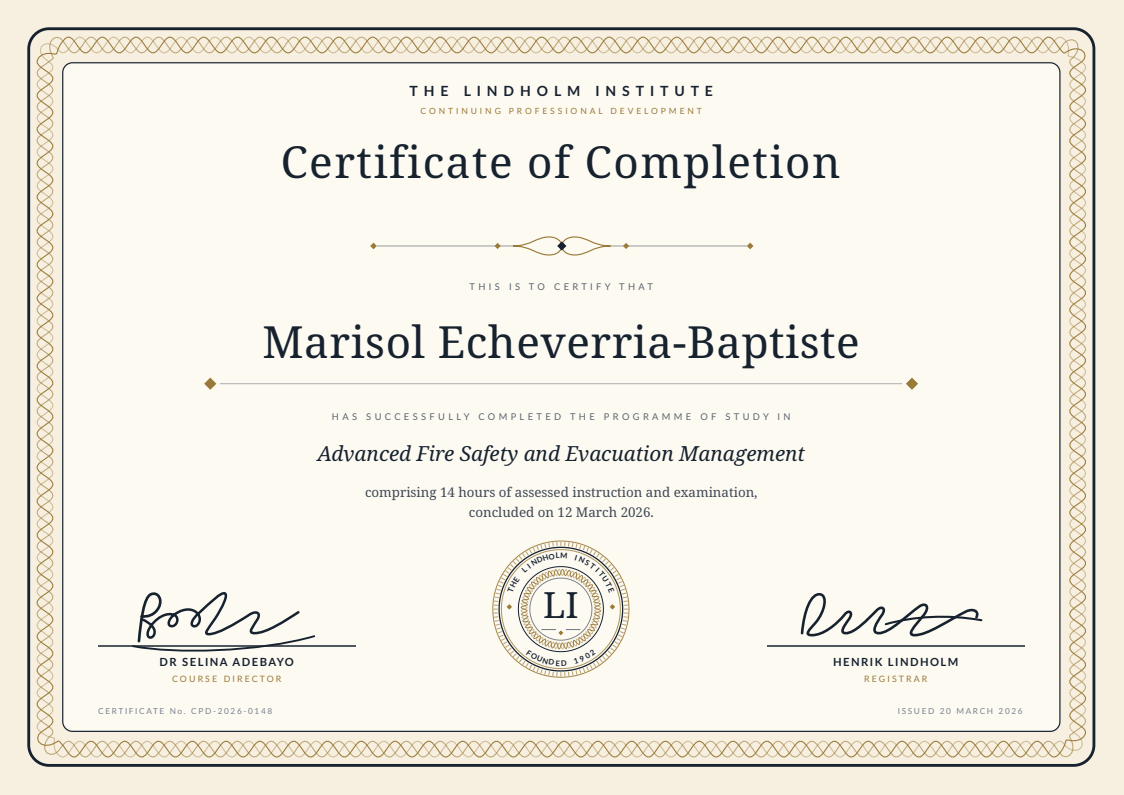
A landscape A4 course completion certificate with a drawn guilloche border and a proper seal, set so the attendee name is the largest thing on the page. Beside it sits the attendee sheet that fills it in, one row per person.
Free for personal and commercial use, no attribution required. The license, in one paragraph.
Try it with your rows
Paste up to 25 rows from your spreadsheet and get one PDF per row in this design, with no account.
Free for up to 50 documents a month, shared by everyone on the same internet connection. Each page carries a small "Made with SheetRender" line at the foot. Your rows are only used to make the documents. Preview and PDF links stop working after an hour, and the files are deleted soon after.
Copy the cells from Excel or Google Sheets™, headings included, and paste them here. CSV text works too.
Who a certificate generator from Excel is for
You ran a training day for sixty people and the certificates are due Friday. This is the matched pair for that job: an award certificate template that already looks like it came from an institution, and the attendee spreadsheet that drives it. Every column maps to one visible part of the page, so it works as a bulk certificate generator whether the roster arrives as a CSV, as an Excel file, or as a tab in Google Sheets™. I wrote it for the coordinator who ran the course, not for the designer who was never on the invite.
What is in the spreadsheet
The CSV and the Excel file hold the same 12 example rows. Every column below fills one part of the document.
| Column | Fills |
|---|---|
recipient_name | The attendee, set as the largest line on the certificate. |
course_title | What they completed, printed in italics under the citation line. |
course_hours | Taught hours, read into the sentence below the course title. |
completion_date | The day the course finished, in that same sentence. |
certificate_id | Your reference for this certificate, set quietly in the bottom left corner. |
issue_date | When the certificate was issued, bottom right. |
instructor_name | Printed name under the left signature. |
instructor_title | Role line under the left signature, in small letterspaced caps. |
registrar_name | Printed name under the right signature. |
registrar_title | Role line under the right signature. |
What to change before you send it
Start with the institution. The wordmark and the line under it are ordinary text, and the seal is inline SVG whose only editable parts are the LI monogram and the two arcs of lettering around it. The signatures are SVG paths rather than scans, so either redraw them from your own signatories or delete both paths and leave the ruled lines to be signed by hand, which is what most awarding bodies do anyway. The palette is two hex values, the deep ink #17222F and the bronze #9A7A38: find and replace the pair and the whole sheet reskins, border and seal included. If your certificates carry a grade, a score, or an awarding body reference, add the column and extend the sentence under the course title.
How to use it
- 1
Download both files. Open data.csv in whatever spreadsheet you already use and replace the twelve sample rows with your roster, one row per attendee.
- 2
Fix the names before anything else. Print each one exactly as that person spells it, capitals and accents included. Cleaning up "SANTOS, maria" after sixty PDFs have rendered is the slowest part of any certificate run.
- 3
Open example.html in a browser to see the finished design. It is one self-contained file with no images in it, so the institute wordmark and the LI monogram at the centre of the seal are both just editable markup.
- 4
Print one test copy before you commit to the batch. Set the page to A4 landscape and switch background graphics on, or the cream paper tone and the gold border drop out and you get black text on white.
- 5
To do the whole roster at once you want a certificate generator from Excel: something that reads the sheet and the design together. Upload data.csv and example.html to SheetRender, which is ours, and it reads the design off the example, maps each column to the spot it fills, and writes one named PDF per row.
Generate certificates in bulk from a spreadsheet
The download is yours either way. What takes the time is the other 11 rows. Upload this spreadsheet and this example document to SheetRender and it builds the template for you, then renders one correctly named PDF for every row. It is our product, so read this knowing that. The free plan covers 50 documents a month and puts a small "Made with SheetRender" line at the foot of every page, which a certificate someone frames will not survive. Rendering on a schedule is paid.
Frequently asked questions
- How do I make a certificate for every name in a spreadsheet?
- Keep one row per attendee with the name spelled exactly as it should print, then run that sheet against a single certificate design instead of saving sixty copies of a file. Canva Bulk Create and Autocrat with Google Slides™ both do this, and so does SheetRender, which takes an example.html like this one as the design and writes one PDF per row. Our guide to bulk certificate generation compares the four routes and says which one wins at which batch size.
- Will it print properly on card?
- Card is what it is drawn for. Print A4 landscape at 100 percent scale with background graphics turned on, on 250gsm or heavier. The border sits 8mm inside the trim, so a desktop printer's unprintable margin will not clip it. What you will see on a printer that cannot bleed to the edge is a thin white rim around the cream paper tone, which nobody has ever noticed on a framed certificate.
- What happens to a recipient name that is too long for the line?
- It holds on one line to around 35 characters at the size used here. "Konstantinos Papadopoulos-Vasileiou" fits, sitting a little wider than the rule beneath it. Beyond that the name wraps to a second line and pushes the rest of the page down, so drop the recipient font size two or three points if your roster runs longer. Render your longest name first, every time.
- Can I use this with Google Sheets™ rather than Excel?
- Yes. The download is a plain CSV and a plain HTML file, so anything that reads a spreadsheet can drive it. File then Import in Google Sheets™ takes data.csv as is. SheetRender can also pull the roster from a Google Sheets™ snapshot instead of an upload, which saves exporting a file every time a cohort finishes.
- Does the certificate ID make the certificate verifiable?
- No. CPD-2026-0148 is a reference you assign in your own sheet so you can look up who received what and when. It proves nothing by itself, because a PDF is a picture of a claim. If you need a public verification page or a LinkedIn badge, that is a credentialing platform's job, not a certificate template's.
- What does it cost to render a whole cohort?
- The template and the sheet are free to download and yours to keep, with no signup. If you render them through SheetRender, the free plan covers 50 documents a month and every page carries a small "Made with SheetRender" mark, so a sixty person cohort needs a paid plan to come out clean. Rendering on a schedule is a paid feature too.
More free templates
- Mail merge letterA mail merge letter template that is already a finished document: a renewal notice on a proper letterhead, with the contact spreadsheet behind it. Row one is filled in and eleven more rows are waiting.
- Job offer letterA job offer letter template that reads like something a real HR team sends. The key terms sit in their own panel, so the candidate lands on the salary and the start date before anything else, and the acceptance block at the foot gives them somewhere to sign. It comes with the candidate spreadsheet behind it.
- Donation receiptA one page donation receipt template with the donor spreadsheet behind it: a warm opening line over a gift summary block with the amount set large, and a record keeping panel you fill in with your own registration number and wording.